Some time ago I was looking for a new Scratch project idea, which would help kids to learn coding, and be challenging and fun at the same time. For children interested in solving puzzles and in math. "Chess", I thought, "it has got to be chess".
In general,
MIT's Scratch platform is probably the least suited programming and runtime environment to implement a chess engine. It was designed for other purposes - for simple games and animations, programmed by kids. The language's capabilities are limited on purpose, esp. regarding structured programming, there are no local variables, no collections other than lists of strings, no bitwise operations (hence no
bitboards), function parameters cannot change, and Scratch is very slow and even has some performance throttling built in (so that kids wouldn't have to worry about frame timing). But that hasn't stopped people from writing pen-based 3D games in Scratch. And for the chess engine case, that just meant it was bit more difficult, and that no implementation would ever reach the playing strength of chess games on other platforms. So perfect, it was just the challenge I was looking for.
My approach was to try different ideas, and only when I was stuck, I investigated about underlying chess programming theory in certain areas. So I came up with move ordering (based on iterative deepening), square piece tables, mobility evaluation and attack tables myself - I just fine-tuned the crude original implementations later, after reading on
https://chessprogramming.wikispaces.com and other places. Other things like alpha/beta-pruning or quiescence search I picked up from there directly.
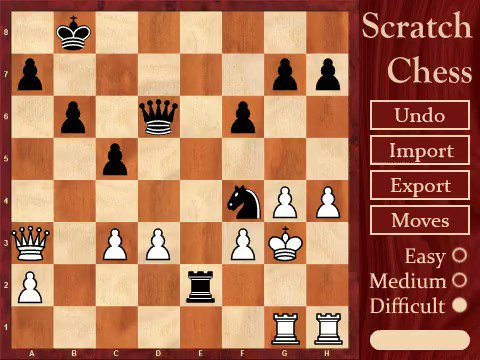
Kochy-Richter checkmate detected by GoK -
view video
The First Week - CoderDojo Linz Chess
The
"Game of Kings" project started as a tutorial for the
CoderDojo Linz Kids Programming Club. I had implemented some other Scratch games before, which were all accompanied by step-by-step tutorials for children to re-create the programs on their own. It was Sunday evening, CoderDojo takes place Fridays, so I had four nights for coding and one for writing the tutorial. This is how that went:
Day #1
At first I worked on the graphical user interface. I found some nice open-usage chess graphics, and drew the pieces via
Scratch Pen functions, applying the
Stamp operation. Sprites were only used for animating piece-movement. I preferred a simplistic 2D bird’s eye view to complex 3D graphics or similar. And user input should be intuitive and require just two clicks: first click the piece to move, then click the target field. When tinkering about how to represent board data in memory, I ended up with a
Scratch List with 64 entries, one for each board field. The list contains
Centipawn values for each type of piece - negative ones for white, positive ones for black. E.g. the black queen’s value is “900”, rook is “500”, bishop “330”, knight “310”, pawn “100”, and finally a king is “20000” (capturing a king surpasses everything else combined). By adding up all the piece values on the board, one ends up with a material evaluation of the current board.
Day #2
Day #2 was dedicated to ramping up a chess engine prototype. I was aware that this would require a
Move Generator and a
Board Evaluation Function, joined together by a
MiniMax algorithm - a
recursive approach, with one recursion for each subsequent move, spanning up a tree of moves. On each tree leaf, that is after the final move, the resulting board would be evaluated. I guessed the program could look ahead three moves (“
Ply 3”) and put a hardcoded limit there. Luckily recursions are possible in Scratch via
Custom Blocks, but local state cannot be kept, as local variables don’t exist, and block parameter values cannot be changed. So, I applied lists for emulating a
call stack. Every local variable has its own list. Some other Scratch chess engines have a dedicated block for each Ply, but I didn’t want to introduce duplicate code (by now we are at a move depth of 12 including Quiescence).
I also implemented a move generator, initially for pawns and knights, and had the engine make its first moves. The move generator filled a move list for every search depth level with all possible moves at that point. Those moves were then applied one-by-one, MiniMax was invoked again for the next depth, and after returning the move was reverted to bring the board back to its original state. A move was represented by a 4-digit number, referring to the source and target fields. E.g. Nb8a6 would be “0217” – a move from field 02 to field 17 on the board.
Day #3
Next I completed the move generator for all other pieces. And I read about
Alpha/Beta Pruning on the
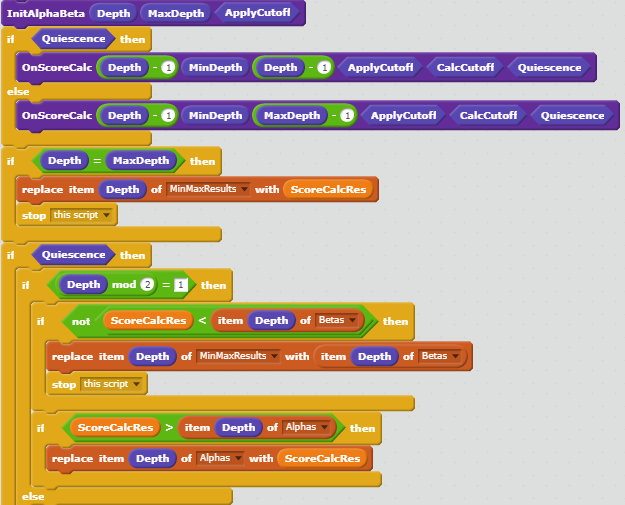
Chess Programming WIKI, which was an eye-opener. Alpha/beta pruning allows to discard all moves early in MiniMax which won’t make sense anyway - something that the human mind does intuitively. Alpha and beta are assured lower and upper bounds for the board evaluation, which are passed up and down the recursive MiniMax calls and checked on each move. We can then ignore anything worse than alpha, because we will not make a move that’s not better than the best we have found so far. And we can ignore anything better than beta, because the opponent has another move option that places him into a better position than the current one. This lead to a major speedup.
I then also implemented positional consideration to the board evaluation function as well by using
Piece Square Tables (the tables for pawns and kings even distinguish between midgame and endgame). This made pieces on certain fields more valuable than on others. Check and checkmate testing was added too, simply by invoking the MiniMax, either for one move of the same side (check), or two consecutive moves in normal order (checkmate), and then probing for king captures. And I coded support for castling. The engine was able to play a correct game, apart pawn promotion, and also en-passant, which was added some weeks later.
Day #4
The final coding evening was dedicated to pawn promotion, code cleanup, and to verifying that the user input was valid. Pawn promotion was a quick and dirty implementation and stayed like this for months. This resulted in several lost games against
Samueldora’s Bonsai later, until I handled promotion in a generic way, just like any other move, so it would have full evaluation coverage.
Day #5
The day before the CoderDojo event, I wrote
the programming tutorial. Recreating all code would have been too much effort for the CoderDojo Scratchers, so I limited that task to the MiniMax and Evaluate blocks. I have not found the time to translate the tutorial to English yet, so for now
here is the Google-translator version (unfortunately it translates “Move” to “Train”). It includes a screenshot of the engine code back then, which you may want to compare in complexity to the current version. I then published the project under the name "Game of Kings".
Extensions and Tuning
At this point the chess engine was working fine, delivering a Ply3 game at around 25 seconds think time. It was kind of fun, but slow with mediocre playing skills. I had not invested any time in performance tuning yet, which would be the key to look ahead more moves, hence increase playing strength. All other Scratch engines were at Ply3 or Ply4 too. My goal was to get to Ply6, as well as improving the evaluation function. And it took me several months to accomplish this. Here is what I did:
(1) Opening Book
I cranked out a quick Opening Book implementation, just as a proof of concept, with something like 10 common openings. Luckily user
Grijfland picked up there and put a lot of work into what finally became GoK’s complete opening book. Thanks a lot for that! You can notice the opening book is applied at the beginning of a game, when there is nearly no think time spent.
(2) Additional Evaluation Considerations
Over time I added support for evaluating double/isolated pawns, double bishops, early queen movement, castling and king protection, and similar to the evaluation function, as well as special support for king/queen and king/rook endgame scenarios. Some of those calculations are costly and are not done at the MiniMax leaf, but earlier up the tree.
(3) Incremental Evaluation
Evaluating the whole board at each MiniMax tree leaf is expensive too. Instead, GoK now evaluates the whole board only once at the beginning, and then just adds/subtracts the material and positional changes connected with each subsequent move.
(4) Move Ordering
By ordering the move lists from best move to worst move, alpha/beta pruning can be much more efficient. The alpha/beta funnel will be smaller early on, allowing to cutoff more moves outside the funnel immediately. GoK first applies known hash-moves that have led to pruning on the same board before (this does not even require move generation), then promotions, then good captures (according to
Most Valuable Victim - Least Valuable Aggressor Evaluation, or short MVV/LVA), then so called
KillerMoves (which led to pruning on different but similar boards before), and then the rest of moves according to their expected positional effect. Additionally, on Ply1, there is
Iterative Deepening (see below). With move ordering, GoK currently only has to traverse 5 out of 35 generated moves in average. And when transposition tables are applied (see below), that number is even smaller (AKA
“Branching Factor”). Imagine GoK on Ply6, having to evaluate 35 moves on each MiniMax call. Those are 35^6 = 1,838,265,625 boards to be evaluated. But if we can skip 30 out of 35 moves each time, we end up with only 5^6 = 15,626 boards.
(5) Transposition Tables
Every board ever evaluated in the current MiniMax run is stored in a so-called Transposition Table (whose underlying implementation is a
Hashtable). Table entries consist of board
hash (key), and board evaluation (either exact, or upper/lower-bound, depending whether there was an Alpha/Beta cutoff) plus the best follow-up move (value). If we ever encounter a board we have seen again, we can then re-use what we have calculated before. Board hashes are created using
Zobrist Hashing. Bitwise operations like
XOR are not supported by Scratch, so fast calculating of hashes, and incrementally adding / removing hash values was a challenge too. In Scratch terms, every entry member requires a list. Those lists are pre-allocated with 256k slots.
(6) Move Generator Lookup Tables
The original move generator was pretty naïve and had hardcoded instructions for calculating where each piece could move. Now all those calculations are done in advance before starting the game - for every piece, on every field. The result is stored in lists and can be looked up much more quickly.
(7) Attack Tables
Each time we calculate the next round of moves, we also calculate which fields are currently attacked (and - albeit currently disabled, as it is only used for SEE - by which kind of pieces). This ensures that a king will not enter a checked field, and is the data basis for static exchange evaluation (SEE). To prevent runtime overhead, we do that lazily on quiescent moves, namely then when a king could capture a piece.
(8) Quiescence Moves
After a certain search depth has been reached, MiniMax calculates and returns the current board evaluation. But this arbitrary border can lead to horizon effects. For example, consider the final move is a queen capturing a pawn. But what if that queen can be counter-captured, but that information is beyond the current Ply horizon? We could end up sacrificing a queen for a pawn. To prevent this, GoK adds a few extra MiniMax rounds where it only inspects captures, once the maximum Ply depth has been reached. GoK can go up to 15 Ply levels; on the Scratch 2.0 runtime it usually between Ply6 and Ply10, with additional Quiescence moves.
(9) Mobility
GoKs also considers how many target fields each piece can reach on the final two Plys. Extra mobility is rewarded accordingly in move evaluation. There are lookup tables for each piece, which map target field count to evaluation value.
(10) Iterative Deepening
It might seem counter-intuitive, but running several MiniMax invocations, each with a larger Ply limit, can improve think time. This is possible due to transposition table caching and move ordering. By applying cached hash moves first - moves that led to a cutoff on a previous run - we might not have to calculate any other moves at all - that is if they trigger a cutoff again. And for Ply1 we keep stats of their evaulations from the run before, and apply them for ordering Py1 moves during the next deepening step.
(11) King Safety, Pawn Storms and Open Ranks
During midgame the king should be protected by pawns. Only during endgame it can play a more active role. Also, a group of approaching pawns can become dangerous, and so can an open rank which might quickly be occupied by the opponent's rook. GoK calculates all of that during board evaluation, and it was the 2nd most important improvement in regard to playing strength (right after increased search depth and quiescent move). I implemented this based on the
Deloctu chess engine's approach - thanks to Mo Terink! Great to see what kind of cool stuff our interns are building in their spare time!
(12) Static Exchange Evaluation (or short “SEE”, implemented but currently disabled)
Static Exchange Evaluation examines the consequence of a series of exchanges on a single square after a given move and calculates the likely evaluation material to be lost or gained. Based on attack tables (see above), I implemented SEE and replaced MVV/LVA in move ordering, but the results were not sufficient, so SEE is currently deactivated. I read later that the primary application of SEE is in other areas, not in move ordering, partly because of its overhead.
While the main focus was on performance tuning, I also added some other features, e.g. providing three difficulty levels (higher level = more search depth, plus on level “Difficult” think time is measured and search depth is adjusted after each move), underpromotion, support for playing black, undoing moves, PGN/FEN import/export, and lichess.org integration for automatic game analysis.
Game of Kings has won the last two Scratch chess tournaments, and reached several draws against the AI chess engine Leela Chess Zero. BTW, runinng GoK on a fast Scratch engine like Sulfurous increases playing strength significantly:
https://sulfurous.aau.at/html/app.html?id=148769358.
Later I also cranked out an
online two player version of GoK
by using cloud variables. Any Scratcher logged in to the website can
take part, and the community can watch the ongoing game. In case
there is one player missing, the GoK engine steps in. It might even play
against itself. Feel free to give it a try, I'd be happy to hear your
feedback in the project's comment section.