
Thursday, October 14, 2010
The Story Behind Balsamiq Mockups
Peldi Guilizzoni writes on the creation of Balsamiq Mockups. They have indeed built a wonderful tool, elegant in its design, simple in its usage, yet extremely powerful in what can be achieved by applying it. Our UI folks have been using Balsamiq Mockups since summer 2008, but I just happened to read the history of its creation today. What a truly inspiring story - sometimes one has to take risks to fulfill his dream.
Saturday, October 02, 2010
The Best Programmers...
The best programmers are not marginally better than merely good ones. They are an order-of-magnitude better, measured by whatever standard: conceptual creativity, speed, ingenuity of design, or problem-solving ability.
(Randall E. Stross)
Friday, September 03, 2010
SqlServer: Favor Inline UDFs Over Table Variables
T-SQL's Table Variables surely do have their benefits, but several drawbacks as well. We used to apply them in the past within larger T-SQL batches, in order to save and reuse some smaller query results, and to avoid code duplication:
But some databases grew in size far beyond original expectations, and those table variables that used to hold 100 rows, now hold 10.000 rows or more, and spill over into TempDB, hence perform badly.
So I replaced them with Inline User Defined Functions (these are table-valued UDFs, which only consist of a single Select statement):
They can then be inlined like this:
This means high performance (due to the UDF query being inlined, query optimizer can do quite some magic) AND avoiding code duplication. Nice!
declare @MyTable table (...)

insert into @MyTable(...)
select ...

select *
from   @MyTable MyTable
       inner join ...
where  ...
But some databases grew in size far beyond original expectations, and those table variables that used to hold 100 rows, now hold 10.000 rows or more, and spill over into TempDB, hence perform badly.
So I replaced them with Inline User Defined Functions (these are table-valued UDFs, which only consist of a single Select statement):
create function dbo.MyUdf(...)
returns table
as
return (
    select ...
)
go
They can then be inlined like this:
select *
from   (dbo.MyUdf(someparam)) MyVirtualTable
       inner join ...
where  ...
This means high performance (due to the UDF query being inlined, query optimizer can do quite some magic) AND avoiding code duplication. Nice!
Thursday, September 02, 2010
SqlServer Standard Edition DOES Support Indexed Views
Why on earth do nine out of ten articles on SqlServer Indexed Views state, that they are only available in Enterprise and Developer Edition? This is blatantly wrong, and prevents developers from using a great performance tuning feature.
Standard Edition DOES support Indexed Views (and from what I have heard, but not tried: even so does Express Edition). The only difference is, that one has to provide a "with (noexpand)" query hint in order for the Indexed View to be applied in Standard Edition (I checked execution plans to go sure). Plus Enterprise Edition can choose to use an Indexed View for optimization, even if it does not appear in the original query.
I think this whole confusion might be caused by Microsoft's SqlServer feature matrices, which are pretty unclear on that topic, too.
Standard Edition DOES support Indexed Views (and from what I have heard, but not tried: even so does Express Edition). The only difference is, that one has to provide a "with (noexpand)" query hint in order for the Indexed View to be applied in Standard Edition (I checked execution plans to go sure). Plus Enterprise Edition can choose to use an Indexed View for optimization, even if it does not appear in the original query.
I think this whole confusion might be caused by Microsoft's SqlServer feature matrices, which are pretty unclear on that topic, too.
Wednesday, September 01, 2010
.NET ValueType Equals()/GetHashCode() Performance
As most people are aware of, .NET Framework's builtin implementations of Equals() and GetHashCode() for ValueTypes are based on Value Equality (as opposed to many ReferenceTypes, where those methods are based on Reference Equality). The problem is, those ValueType.Equals() and GetHashCode() implementations are quite slow for user-defined structs - which is not surprising, as they must apply reflection for obtaining field and property values.
That's why it's better to code your own Equals() and GetHashCode() methods in these cases. The task is pretty much straightforward - just compare those fields and properties, that define equality, in Equals(), and XOR their shifted values (or numeric representations of their values) in GetHashCode():
I recently was asked to tune some code, and replaced several nested loops with dictionary lookups - only to find out that this was not as fast as I had expected, due to structs being applied as dictionary keys. Provided my own Equals() and GetHashCode() implementations, and voila - ten-fold speedup!
That's why it's better to code your own Equals() and GetHashCode() methods in these cases. The task is pretty much straightforward - just compare those fields and properties, that define equality, in Equals(), and XOR their shifted values (or numeric representations of their values) in GetHashCode():
public override bool Equals(object obj) {
    Nullable<MyType> other = obj as Nullable<MyType>;
    return other != null &&
           this.X == other.Value.X &&
           this.Y == other.Value.Y;
}

public override int GetHashCode() {
    return (this.X * 31) ^ this.Y;
}
I recently was asked to tune some code, and replaced several nested loops with dictionary lookups - only to find out that this was not as fast as I had expected, due to structs being applied as dictionary keys. Provided my own Equals() and GetHashCode() implementations, and voila - ten-fold speedup!
Monday, August 02, 2010
Developer Candidate Interviews
Uncle Bob / Robert Martin writes in Developer Certification WTF?:
Yeah, and what if we would additionally let them write some code during the interview? I know this sounds crazy to many software development companies, with some notable exceptions (Microsoft, Google and Apple for example - hmmm, maybe this should make us think?)
So what if we… interviewed ... candidate developers? What if we asked them what accomplishments they’d achieved in previous employment. What if we asked them who they used to work with. And… ok, this is even wilder ... what if we called those references and checked them out?
Yeah, and what if we would additionally let them write some code during the interview? I know this sounds crazy to many software development companies, with some notable exceptions (Microsoft, Google and Apple for example - hmmm, maybe this should make us think?)
Sunday, May 02, 2010
How to improve Visual Studio .NET Build Performance
Funny how slow Visual Studio .NET compile times in often are seen as being carved in stone.
"Building our solution takes 3 minutes, so each time I change a line of code in a base component and run the app, I must wait 3 minutes. Period."
Is this really how software development should work these days?
As projects grow over time, compilation gets slower and slower. Productivity goes south when people are watching the compiler do its work half the time. The decline creeps in and people think this is just normal, until a new developer arrives and throws his hands up in horror.
Also, Visual Studio seems to lack behind other IDEs (most notably Eclipse) on this topic. Eclipse has built-in support for REAL incremental background compilation for ages now (it compiles while the developer types (or during idle time), hence can start the application with no or little delay once he hits <Run>). Visual Studio still doesn't.
So let's see what we can do to speed up things in Visual Studio.
(1) Decrease File IO / Speed Up Remaining File IO
Use the same output path for every project in your solution, e.g. "..\Output\Debug" for "Debug" configuration (Project / Properties / Build / Output Path). All assemblies will be created there, so no need to copy files back and forth between project folders.
If there is only one output path, project references can be set to "Copy Local = False" (References / Properties / Copy Local). This furthermore decreases File IO.
I have experienced up to three-fold buildtime improvements by applying that simple configuration change.
In addition, you might want to mitigate virus scanner policies for scans on devenv.exe file access, as well as using a separate phyiscal drive for source files and compile output, maybe even a SSD drive.
(2) Prevent non-dependent project compilation
If a solution contains projects, that the current startup project does not depend upon (e.g. test projects), compiling those projects can be avoided by selecting the option "Only build startup projects and dependencies on Run" under Tools / Options / Projects and Solutions / Build and Run.
(3) Prevent project dependency tree compilation
Visual Studio resp. MSBuild compiles all projects with changes, plus the complete project dependency tree underneath those projects. This is all good and fine, but it also implies that once only one line of code is changed in a commonly used base class, this might cause a complete solution recompilation. But why should we recompile everything, when say only the interior of a single method implementation has changed?
When you know that you are going to change something deep down in your dependency tree, but won't be altering non-private method signatures, here is what you can do:
Option 3.1: Manually avoid dependent project recompile
Under Tools / Options / Projects and Solutions / Build and Run, choose "On run, when projects are out of date: Never build". Then, manually build the project only where sourcecode has been edited (Build <projectname> resp. Shift-F6), and finally run the startup project. This too only works when all projects use the same output folder (see (1)).
Option 3.2: Additional solution configurations
Create additional solution configurations for partial builds, and apply identical output paths as defined in (1) (Solution / Properties / Configuration Properties / Configuration Manager / Active Solution Configuration / New).
Solution configurations allow for defining which projects should be built, and which should not; this can lead to much smaller build dependency trees. We might provide configurations for framework class libraries, for functional modules or for data access projects, and so on. And once we know we only are going to change the inner workings of certain components, we switch to the suitable solution configuration first.
Other dependent projects are not going to be compiled if they are not part of the active configuration. What does that imply at runtime? As there are no newly built dependent assemblies, the previously built assemblies (still residing in "..\Output\Debug") are going to be loaded, which is just what we want.
Option 3.3: Decouple projects, use assembly references instead of project references
Decoupling is not only recommended for software architecture in general, it might also boost compiletime. When application layers are separated (e.g. coding against interfaces, and acquiring implementation classes only at runtime by using factories, dependency injection and the like), code changes other than interface modifications will not lead to dependent project compilations any more.
Also, choose solution structure carefully. You don't want one project containing 80% of all code, and the rest spread on ten other projects. Or consider having Team A work on projectset #1, and Team B working on projectset #2, which depends on what Team A has produced. Provide separate solution files for each Team, let Team A deliver libraries to Team B, and integrate them in Team B's solution by using assembly references (instead of project references).
Take those options with a grain of salt, though. Once signatures of methods invoked by other assemblies are actually altered, the compiler will not be able to pick that up, and runtime errors will occure. In addition, these approaches require stable assembly version numbers.
"Building our solution takes 3 minutes, so each time I change a line of code in a base component and run the app, I must wait 3 minutes. Period."
Is this really how software development should work these days?
As projects grow over time, compilation gets slower and slower. Productivity goes south when people are watching the compiler do its work half the time. The decline creeps in and people think this is just normal, until a new developer arrives and throws his hands up in horror.
Also, Visual Studio seems to lack behind other IDEs (most notably Eclipse) on this topic. Eclipse has built-in support for REAL incremental background compilation for ages now (it compiles while the developer types (or during idle time), hence can start the application with no or little delay once he hits <Run>). Visual Studio still doesn't.
So let's see what we can do to speed up things in Visual Studio.
(1) Decrease File IO / Speed Up Remaining File IO
Use the same output path for every project in your solution, e.g. "..\Output\Debug" for "Debug" configuration (Project / Properties / Build / Output Path). All assemblies will be created there, so no need to copy files back and forth between project folders.
If there is only one output path, project references can be set to "Copy Local = False" (References / Properties / Copy Local). This furthermore decreases File IO.
I have experienced up to three-fold buildtime improvements by applying that simple configuration change.
In addition, you might want to mitigate virus scanner policies for scans on devenv.exe file access, as well as using a separate phyiscal drive for source files and compile output, maybe even a SSD drive.
(2) Prevent non-dependent project compilation
If a solution contains projects, that the current startup project does not depend upon (e.g. test projects), compiling those projects can be avoided by selecting the option "Only build startup projects and dependencies on Run" under Tools / Options / Projects and Solutions / Build and Run.
(3) Prevent project dependency tree compilation
Visual Studio resp. MSBuild compiles all projects with changes, plus the complete project dependency tree underneath those projects. This is all good and fine, but it also implies that once only one line of code is changed in a commonly used base class, this might cause a complete solution recompilation. But why should we recompile everything, when say only the interior of a single method implementation has changed?
When you know that you are going to change something deep down in your dependency tree, but won't be altering non-private method signatures, here is what you can do:
Option 3.1: Manually avoid dependent project recompile
Under Tools / Options / Projects and Solutions / Build and Run, choose "On run, when projects are out of date: Never build". Then, manually build the project only where sourcecode has been edited (Build <projectname> resp. Shift-F6), and finally run the startup project. This too only works when all projects use the same output folder (see (1)).
Option 3.2: Additional solution configurations
Create additional solution configurations for partial builds, and apply identical output paths as defined in (1) (Solution / Properties / Configuration Properties / Configuration Manager / Active Solution Configuration / New).
Solution configurations allow for defining which projects should be built, and which should not; this can lead to much smaller build dependency trees. We might provide configurations for framework class libraries, for functional modules or for data access projects, and so on. And once we know we only are going to change the inner workings of certain components, we switch to the suitable solution configuration first.
Other dependent projects are not going to be compiled if they are not part of the active configuration. What does that imply at runtime? As there are no newly built dependent assemblies, the previously built assemblies (still residing in "..\Output\Debug") are going to be loaded, which is just what we want.
Option 3.3: Decouple projects, use assembly references instead of project references
Decoupling is not only recommended for software architecture in general, it might also boost compiletime. When application layers are separated (e.g. coding against interfaces, and acquiring implementation classes only at runtime by using factories, dependency injection and the like), code changes other than interface modifications will not lead to dependent project compilations any more.
Also, choose solution structure carefully. You don't want one project containing 80% of all code, and the rest spread on ten other projects. Or consider having Team A work on projectset #1, and Team B working on projectset #2, which depends on what Team A has produced. Provide separate solution files for each Team, let Team A deliver libraries to Team B, and integrate them in Team B's solution by using assembly references (instead of project references).
Take those options with a grain of salt, though. Once signatures of methods invoked by other assemblies are actually altered, the compiler will not be able to pick that up, and runtime errors will occure. In addition, these approaches require stable assembly version numbers.
Wednesday, March 31, 2010
And I shall call it "Foreign Key Cascade Delete"
I know it sounds kind of stupid trying to implement cascade delete in T-SQL, when all you have to do is to activate the "cascade delete" option on each foreign key within the association graph. Similarly stupid as implementing referential integrity by hand.
But imagine a case where you generally don't want cascade delete in normal production mode (because no user should be able to delete a parent row which has any child rows still referencing it). And unfortunately there are those rare occasions, when just for the moment, for one single parent row, cascade delete would make sense again, because you really have to get rid of it, only exceptionally.
Of course one could simply activate cascade deletes for this single transaction. But I don't like to change database schemas in production.
The guys at sqlteam.com came up with a different solution: A stored procedure, invoked recursively, traversing over all foreign key relations and deleting child rows bottom-up.
Sounded nice, but did not work in our case. The approach was based on nested subqueries, and from about 8 nested queries on, SqlServer refused to even calculate a query execution plan (I do have sympathy for SqlServer here, I wouldn't enjoy building an execution plan on queries like this either. And even with a plan, the performance would most likely be extremely poor). Plus the script could not handle foreign key relation cycles (I mean cycles on a table-basis, not on a row-basis; the latter can't be solved anyway), a fact that caused a stored procedure "stack overflow" (the limit is 32 recursive calls) on our database.
I then started to adapt the sqlteam.com script in order to make it work, and was about halfway done, when I noticed that commentator GreySky had already provided a solution which was following the same approach I had planned for. He solved the execution plan / performance issue by storing parent primary key values in a temptable, together with information about the current call level, so that the delete criteria would be ONE simple IN-subselect instead of many nested subselects.
So GreySky's script worked fine, with the exception that it still did not handle cycles in foreign key relations. But at this point, with a temptable holding all parent primary keys at hand, this was a simple task. I only had to add an extra column storing the table name that the primary keys belonged to. Thus it was possible to extend the statement's where-criteria to "visit" only those child rows, that had not been marked for deletion before. (Nearly) like Dijkstra's algorithm, you know ;-) Works like a charm!
But imagine a case where you generally don't want cascade delete in normal production mode (because no user should be able to delete a parent row which has any child rows still referencing it). And unfortunately there are those rare occasions, when just for the moment, for one single parent row, cascade delete would make sense again, because you really have to get rid of it, only exceptionally.
Of course one could simply activate cascade deletes for this single transaction. But I don't like to change database schemas in production.
The guys at sqlteam.com came up with a different solution: A stored procedure, invoked recursively, traversing over all foreign key relations and deleting child rows bottom-up.
Sounded nice, but did not work in our case. The approach was based on nested subqueries, and from about 8 nested queries on, SqlServer refused to even calculate a query execution plan (I do have sympathy for SqlServer here, I wouldn't enjoy building an execution plan on queries like this either. And even with a plan, the performance would most likely be extremely poor). Plus the script could not handle foreign key relation cycles (I mean cycles on a table-basis, not on a row-basis; the latter can't be solved anyway), a fact that caused a stored procedure "stack overflow" (the limit is 32 recursive calls) on our database.
I then started to adapt the sqlteam.com script in order to make it work, and was about halfway done, when I noticed that commentator GreySky had already provided a solution which was following the same approach I had planned for. He solved the execution plan / performance issue by storing parent primary key values in a temptable, together with information about the current call level, so that the delete criteria would be ONE simple IN-subselect instead of many nested subselects.
So GreySky's script worked fine, with the exception that it still did not handle cycles in foreign key relations. But at this point, with a temptable holding all parent primary keys at hand, this was a simple task. I only had to add an extra column storing the table name that the primary keys belonged to. Thus it was possible to extend the statement's where-criteria to "visit" only those child rows, that had not been marked for deletion before. (Nearly) like Dijkstra's algorithm, you know ;-) Works like a charm!
Wednesday, June 24, 2009
Composite WPF ("Prism") DelegateCommand.CanExecuteChanged Memory Leak
I was happy to hear that the Microsoft Patterns and Practices Team has picked up this Composite WPF ("Prism") bug report that I submitted several weeks ago. From the issue description:
Now this is no showstopper for us as we are very early in the development cycle, and we simply patched DelegateCommand in the meantime by using WeakReferences for its CanExecuteChanged-EventHandlers.
As far as I know the issue has been fixed already, and it is currently going through testing.
When profiling my application I noticed that plenty of EventHandlers had never been deregistered from DelegateCommand's CanExecuteChanged-Event. So those EventHandlers were never been garbage-collected, which caused a severe memory leak.
As registering CanExecuteChanged-EventHandles is done outside application code scope I had expected them to be deregistered automatically as well. At this point I thought this might as well be a ThirdParty WPF control issue, but digging further I read a blog post stating that "WPF expects the ICommand.CanExecuteChanged-Event to apply WeakReferences for EventHandlers". I had a look into RoutedCommand, and noticed it uses WeakReferences as well.
Now this is no showstopper for us as we are very early in the development cycle, and we simply patched DelegateCommand in the meantime by using WeakReferences for its CanExecuteChanged-EventHandlers.
As far as I know the issue has been fixed already, and it is currently going through testing.
Wednesday, June 17, 2009
NHibernate Criteria-Query: Child Collection Not Populated Despite FetchMode.Join When Criteria Exists For Child Table
Example taken from NHibernate Bugreport #381:
The resulting SQL will include a Join to Emails as expected, the resultset returned by the database is OK, but within the object model Contact.Emails is not going to be populated with data. Which means once Contact.Emails is being accessed in code, lazy loading occurs, which probably was not the coder's intention. This is not the case when
is omitted.
The bug report was closed without fix, but contained a comment that "According to Hibernate guys this is correct behavior" and a link to Hibernate bug report #918.
To me that does not sound completely implausible. Hibernate's interpretation ot this criteria tree is that the EMail-criteria is meant to narrow down die Contact parent-row, not the EMail child-rows. HQL queries act just the other way around. Under HQL, additionaly Join-With- or Where-expressions can limit which child rows are loaded into the child collection. I know that HQL - in contrast to Criteria queries - does not apply the fetching strategy defined in the mapping configuration. But with an explicit FetchMode.Join I would have expected Criteria query to do the same.
Apparently under Criteria API this can be worked around by applying an outer Join (which of course is somewhat semantically different):
Which seems kind of inconsistent compared to the inner join scenario, and there is even a Hibernate bug report on that.
What I would recommend anyway: If the goal is to narrow the parent data, but then fetch all the children, why not apply an Exists-subquery for narrowing, and in the same query fetch-join all children without further narrowing. Or, if you prefer lazy loading, simply define fetchmode="subselect" on the association.
On a related topic, eagerly joining several child associations has the drawback that the resultset consists of a cartesian product over all children - lots of rows with duplicate data. Let's say there are three child associations A, B and C with 10 rows each for a given parent row, joining all three associations will blast up the resultset to 1 x 10 x 10 x 10 = 1000 rows, when only 1 + 10 + 10 + 10 = 31 rows would be needed.
And while those duplicates will only lead to duplicate references in the object model (and not to duplicate instances), and even those duplicate references can be eliminated again by using Maps or Sets for child collections, these Joins impose a severe performance and memory drawback on the database resp. ADO.NET level.
Of course one could simply issue N single select statements, one for each table, with equaivalent where-clauses. But that implies N database roundtrips as well. Not so good.
The means to avoid this are Hibernate Criteria- and HQL-MultiQueries. Gabriel Schenker has posted a really nice article on MultiQueries with NHibernate.
More Hibernate postings:
session.CreateCriteria(typeof(Contact))
   .Add(Expression.Eq("Name", "Bob")
   .SetFetchMode("Emails", FetchMode.Join)
   .CreateCriteria("Emails")
      .Add(Expression.Eq("EmailAddress",
      "Bob@hotmail.com"))
   .List();
The resulting SQL will include a Join to Emails as expected, the resultset returned by the database is OK, but within the object model Contact.Emails is not going to be populated with data. Which means once Contact.Emails is being accessed in code, lazy loading occurs, which probably was not the coder's intention. This is not the case when
CreateCriteria("Emails")
      .Add(Expression.Eq("EmailAddress",
      "Bob@hotmail.com"))
is omitted.
The bug report was closed without fix, but contained a comment that "According to Hibernate guys this is correct behavior" and a link to Hibernate bug report #918.
To me that does not sound completely implausible. Hibernate's interpretation ot this criteria tree is that the EMail-criteria is meant to narrow down die Contact parent-row, not the EMail child-rows. HQL queries act just the other way around. Under HQL, additionaly Join-With- or Where-expressions can limit which child rows are loaded into the child collection. I know that HQL - in contrast to Criteria queries - does not apply the fetching strategy defined in the mapping configuration. But with an explicit FetchMode.Join I would have expected Criteria query to do the same.
Apparently under Criteria API this can be worked around by applying an outer Join (which of course is somewhat semantically different):
session.CreateCriteria(typeof(Contact))
   .Add(Expression.Eq("Name", "Bob")
   .CreateCriteria("Emails", JoinType.LeftOuterJoin)
      .Add(Expression.Eq("EmailAddress",
      "Bob@hotmail.com"))
   .List();
Which seems kind of inconsistent compared to the inner join scenario, and there is even a Hibernate bug report on that.
What I would recommend anyway: If the goal is to narrow the parent data, but then fetch all the children, why not apply an Exists-subquery for narrowing, and in the same query fetch-join all children without further narrowing. Or, if you prefer lazy loading, simply define fetchmode="subselect" on the association.
On a related topic, eagerly joining several child associations has the drawback that the resultset consists of a cartesian product over all children - lots of rows with duplicate data. Let's say there are three child associations A, B and C with 10 rows each for a given parent row, joining all three associations will blast up the resultset to 1 x 10 x 10 x 10 = 1000 rows, when only 1 + 10 + 10 + 10 = 31 rows would be needed.
And while those duplicates will only lead to duplicate references in the object model (and not to duplicate instances), and even those duplicate references can be eliminated again by using Maps or Sets for child collections, these Joins impose a severe performance and memory drawback on the database resp. ADO.NET level.
Of course one could simply issue N single select statements, one for each table, with equaivalent where-clauses. But that implies N database roundtrips as well. Not so good.
The means to avoid this are Hibernate Criteria- and HQL-MultiQueries. Gabriel Schenker has posted a really nice article on MultiQueries with NHibernate.
More Hibernate postings:
Tuesday, June 16, 2009
My Amazon Listmania Lists
I had nearly forgotten about them, and was surprised to see that over time nearly 25,000 people have viewed my Amazon Listmania Book Recommendation Lists. Hey I should have received commission! ;-) Subtle hint: The J2EE list is a little bit out-dated by now.
Friday, June 12, 2009
Visualizing TFS Work Items With Treemaps
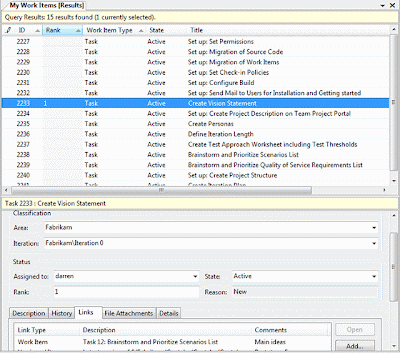
Microsoft Team System / Team Foundation Server is a really nice line of products. Besides version control we heavily rely on TFS Work Items for organizing development tasks. One of our largest project is conducted using Scrum, so we are utilizing Conchango's Scrum Plugin for Team System, plus Conchango Taskboard for Sprint planning. Taskboard is better suited than the general purpose Work Item lists and forms that are part of Visual Studio Team Explorer. Let's compare.
Visual Studio Work Item list:
Conchango Taskboard:
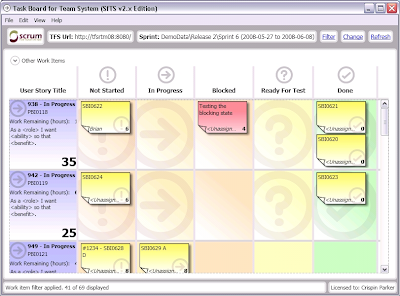
From a certain project size on the Visual Studio Work Item lists just won't scale and end up with heaps of data that one can scroll through forever. Don't get me wrong, those lists are sufficient for standard tasks, but they are cumbersome for gaining insight into the project's big picture. And Conchango Taskboard is for Sprint planning and Product Backlog maintenance only. The Conchango Scrum Plugin does have a set of really nice reports though.
So this is where I decided to ramp up my own little solution, which would be based on rendering Work Item data into Treemaps. This week I hacked out a little prototype in my sparetime (working title "Aurora"):
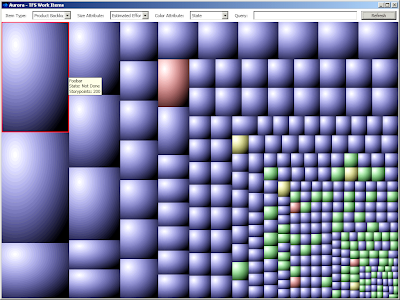
(this is an old screenshot that still misses labeling the treemap blocks)
This configuration example provides an overall impression of the sample project's progress: Green tasks are done, blue tasks are not done, and their size represents their complexity. And this is by no means limited to Scrum projects, it works for all kinds of TFS project templates.
Three simple input parameters are all it takes:
Plus an optional query string for narrowing the list of items.
This approach possibly allows to visualize about 70% of the reports I could think of. I am still wondering how to implement the missing 30%, as they cannot be covered that easily. For instance I want to group Area Paths with equal prefixes by rendering them with the same color. Or simplify the creation of queries (can't expect everyone to know WIQL by heart). And I don't want to over-complicate things either. Any suggestions regarding those matters are highly welcome! Another requirement is to let the user define color mapping. And item hierarchies are still missing, too (that's the "Tree" in "Treemaps" after all).
By the way, I am using woopef's WPF TreeMap control, thanks a lot for making it publicly available. I am also going to open-source Aurora once it provides basic functionality and reaches a certain level of stability, most likely on CodePlex.
Visual Studio Work Item list:

Conchango Taskboard:

From a certain project size on the Visual Studio Work Item lists just won't scale and end up with heaps of data that one can scroll through forever. Don't get me wrong, those lists are sufficient for standard tasks, but they are cumbersome for gaining insight into the project's big picture. And Conchango Taskboard is for Sprint planning and Product Backlog maintenance only. The Conchango Scrum Plugin does have a set of really nice reports though.
So this is where I decided to ramp up my own little solution, which would be based on rendering Work Item data into Treemaps. This week I hacked out a little prototype in my sparetime (working title "Aurora"):

This configuration example provides an overall impression of the sample project's progress: Green tasks are done, blue tasks are not done, and their size represents their complexity. And this is by no means limited to Scrum projects, it works for all kinds of TFS project templates.
Three simple input parameters are all it takes:
- Work Item type (e.g. Product Backlog Item, Sprint Backlog Item, Bug)
- Work Item attribute defining Treemap size (e.g. Storypoints or any other numeric data, or none in case all items should be rendered with equal size)
- Work Item attribute defining Treemap color (e.g. State, Sprint ID, etc)
Plus an optional query string for narrowing the list of items.
This approach possibly allows to visualize about 70% of the reports I could think of. I am still wondering how to implement the missing 30%, as they cannot be covered that easily. For instance I want to group Area Paths with equal prefixes by rendering them with the same color. Or simplify the creation of queries (can't expect everyone to know WIQL by heart). And I don't want to over-complicate things either. Any suggestions regarding those matters are highly welcome! Another requirement is to let the user define color mapping. And item hierarchies are still missing, too (that's the "Tree" in "Treemaps" after all).
By the way, I am using woopef's WPF TreeMap control, thanks a lot for making it publicly available. I am also going to open-source Aurora once it provides basic functionality and reaches a certain level of stability, most likely on CodePlex.
Monday, June 08, 2009
Vanilla Data Access Layer Library 0.6.0 Released
I have just updated Vanilla DAL on Sourceforge. Release 0.6.0 is still in Alpha state, and comes with improved automatic transaction management. I now chose am approach similar to System.Transactions.TransactionScope. Of course nothing as sophisticated, Vanilla DAL's TransactionScope is a simple IDisposable object that consists of a thread-bound transaction and a does some reference-counting. The transaction will be commited when the last TransactionScope is being disposed, resp. rollbacked in case of any exception during execution:
My main problem was how to find out whether the current call to IDisposable.Dispose() happens within the process of exception unwinding. Several people have recommended Marshal.GetExceptionPointers(), which is the only working solution I have found so far. But I consider this a semi-hack. Any better ideas?
By the way, Luis Ramirez has written a nice article on Codeproject.Com, comparing Vanilla DAL to plain ADO.NET, Microsoft Data Access Application Block and SqlNetFramework.
    using (accessor.CreateTransactionScope())
    {
        accessor.Update(new UpdateParameter(northwindDataset.Customers));
        accessor.ExecuteNonQuery(new NonQueryParameter(new Statement("DeleteTestCustomers")));
    }
My main problem was how to find out whether the current call to IDisposable.Dispose() happens within the process of exception unwinding. Several people have recommended Marshal.GetExceptionPointers(), which is the only working solution I have found so far. But I consider this a semi-hack. Any better ideas?
By the way, Luis Ramirez has written a nice article on Codeproject.Com, comparing Vanilla DAL to plain ADO.NET, Microsoft Data Access Application Block and SqlNetFramework.
Sunday, June 07, 2009
Code Coverage Analysis With QmCover
My cousin has developed a graphical code coverage analysis tool for the GNU toolchain. Now I am not really up-to-date regarding the current state of code coverage tools in Unix land (during my old Solaris days all I needed was vi and gcc), but QmCover certainly looks cool!
Saturday, May 30, 2009
Implementing Equals And HashCode In Hibernate POCOs/POJOs
Nearly everybody who uses (N)Hibernate stumbles over this question sooner or later: How to implement Equals() And (Get)HashCode() in Hibernate POCOs/POJOs?
What's the problem? At first sight a natural approach seems to apply the object's primary key in Equals And HashCode implementations - simply delegate the calls to Equals and HashCode to the primary key type. But many primary keys are AutoIncrement / Identity columns which the database will set when inserting rows. So the primary key's value becomes available only after that - which is too late in most cases. E.g. if there is more than one newly created object (Hibernate state "transient") at one point in time, all these objects would appear to be "equal". Additionally when the newly created object has been added to a child collection of type Map or Set, it will be replaced by the next newly created object that comes along. Undoubtedly this is unwanted behavior.
Moreover this breaks the Equals/HashCode contract, because the HashCode value changes once the primary key has been set by the database. This may lead to all kinds of weird things, e.g. Maps / IDictionaries whose implementations depend on HashCode will not be able to find their objects any more.
So what to do about it? Articles on hibernate.org and the holy book of Hibernate "Java Persistence With Hibernate" recommend applying business keys instead of surrogate keys in Equals / HashCode. Business key values are unique too, plus they are available BEFORE the data has been inserted into the database.
I used to follow that advice in former projects, but at times found it difficult to determine which would be my business keys. Sometimes they just don't exist in the application domain.
Plenty of postings point out similar problems. Some people came up with quite sophisticated solutions, e.g. a combined surrogate / business key approach. In case an object is newly created and has not been assigned its database surrogate key yet, it will apply a business key. The business key values and hashcodes will be cached and re-used for the lifetime of the object, even after inserting it into the database table. Hence the Equals / HashCode contract is not broken.
This should work, but seems unnecessarily complicated for me. Reading hibernate.org's famous 109-article once again, I figured that my current project falls into the first of the following three categories:

We don't have composite keys, and there is no need to compare objects from different Hibernate sessions. We do have multiple new instances in Sets, and collections must stay intact after saving. Which means I can omit any custom Equals / HashCode implementations altogether, and can go along with the default reference-based implementations (instead of value-based). And it works like a charm!
More Hibernate postings:
What's the problem? At first sight a natural approach seems to apply the object's primary key in Equals And HashCode implementations - simply delegate the calls to Equals and HashCode to the primary key type. But many primary keys are AutoIncrement / Identity columns which the database will set when inserting rows. So the primary key's value becomes available only after that - which is too late in most cases. E.g. if there is more than one newly created object (Hibernate state "transient") at one point in time, all these objects would appear to be "equal". Additionally when the newly created object has been added to a child collection of type Map or Set, it will be replaced by the next newly created object that comes along. Undoubtedly this is unwanted behavior.
Moreover this breaks the Equals/HashCode contract, because the HashCode value changes once the primary key has been set by the database. This may lead to all kinds of weird things, e.g. Maps / IDictionaries whose implementations depend on HashCode will not be able to find their objects any more.
So what to do about it? Articles on hibernate.org and the holy book of Hibernate "Java Persistence With Hibernate" recommend applying business keys instead of surrogate keys in Equals / HashCode. Business key values are unique too, plus they are available BEFORE the data has been inserted into the database.
I used to follow that advice in former projects, but at times found it difficult to determine which would be my business keys. Sometimes they just don't exist in the application domain.
Plenty of postings point out similar problems. Some people came up with quite sophisticated solutions, e.g. a combined surrogate / business key approach. In case an object is newly created and has not been assigned its database surrogate key yet, it will apply a business key. The business key values and hashcodes will be cached and re-used for the lifetime of the object, even after inserting it into the database table. Hence the Equals / HashCode contract is not broken.
This should work, but seems unnecessarily complicated for me. Reading hibernate.org's famous 109-article once again, I figured that my current project falls into the first of the following three categories:

We don't have composite keys, and there is no need to compare objects from different Hibernate sessions. We do have multiple new instances in Sets, and collections must stay intact after saving. Which means I can omit any custom Equals / HashCode implementations altogether, and can go along with the default reference-based implementations (instead of value-based). And it works like a charm!
More Hibernate postings:
Subscribe to:
Posts (Atom)