Sunday, April 10, 2005

Popular Electronics / January 1975 Edition

Please don't tell anybody [;-)]- but I am currently bidding for an original Popular Electronics January 1975 Edition on eBay.


Yes, that's the one where MITS announced the Altair 8800, the one issue that Paul Allen happened to notice at a local newsstand on Harvard Square, Cambridge (Allen was working for Honeywell in nearby Boston at that time). He bought it and showed to Bill Gates at his friend's dorm room. "It [the PC revolution] is going to happen", Gates knew. Here was their opportunity to do something with Basic...

Tuesday, April 05, 2005

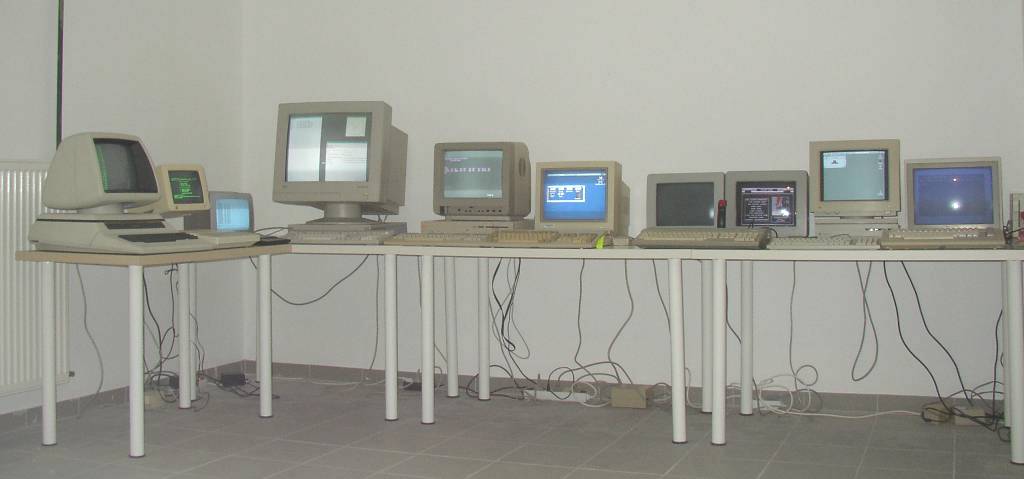
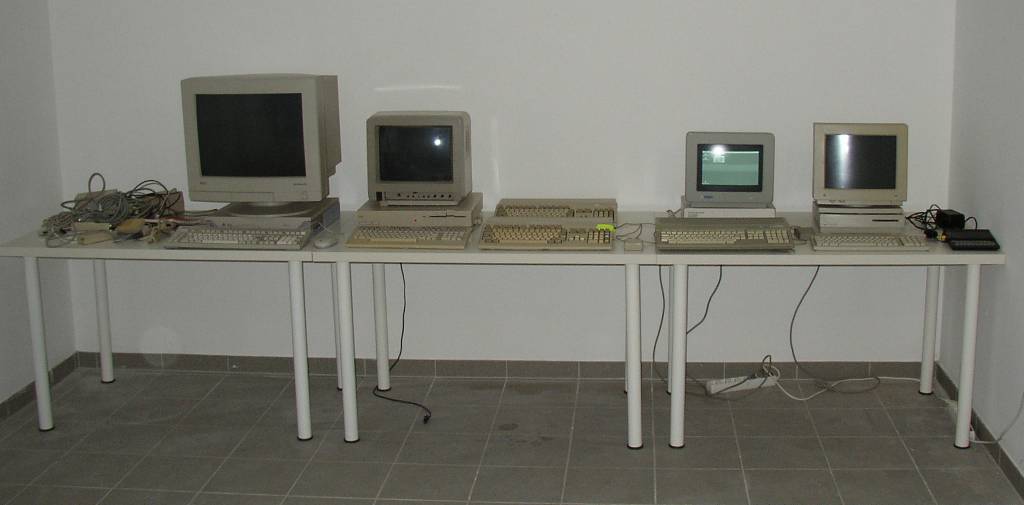
My Computer Museum (Update)


From left to right:
(1) Commodore CBM8032
(2) Apple IIc, Apple II Green Composite Monitor
(3) Sinclair ZX81, B+W TV Set
(4) Sun SparcStation 5, NEC 21" VGA Monitor
(5) Commodore 128D, Commodore 1901 Color Monitor
(6) Commodore Amiga 500, Commodore 1085S Color Monitor
(7) Atari 1040ST, Atari SM124 Monochrome Monitor, Atari SC1224 Color Monitor
(8) Apple Macintosh LC, Apple Monochrome Monitor
(9) Commodore 64, Commodore 1541 Floppy Drive, Commodore 1081 Color Monitor

Latest Purchases:
(1) Apple IIc, Apple II Green Composite Monitor
(2) B+W TV Set for Sinclair ZX81

Currently looking for:
(1) Tape Recorder for Sinclair ZX81

Sunday, April 03, 2005

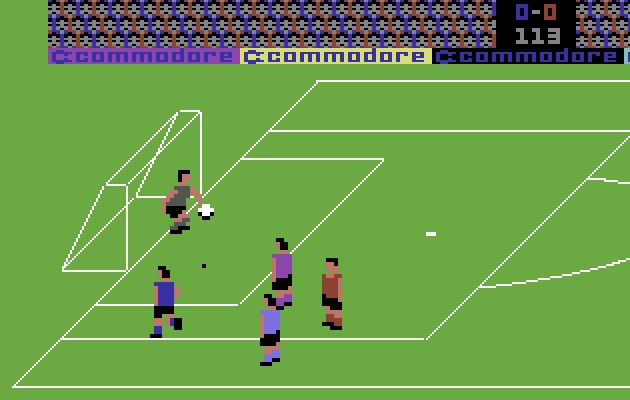
Retro-Computing: International Soccer On The Commodore 64

So I connected my Commodore 1541 floppy drive to my PC's LPT1 port using a XM1541 cable and invoked a transfer program called Star Commander, just to find out that Windows 2000's pre-emptive multitasking and asynchronous I/O just won't allow for the kind of synchronous control required to read from and write to the old 1541 drive. Star Commander even ships with an additional I/O driver for this scenario, but still it just didn't work. I had to switch back to DOS (now, this is one thing DOS is definitely doing a better job in), and voila - no timeouts any more.


Besides getting more or less every ancient program floating around on the internet onto my C64, I can as well transfer data from my old C64 disks to my PC, and run it in any C64 emulator, e.g. VICE. Also, most of my friends did not really keep their Commodores for the last 18+ years, so I can provide them with images of their old C64 disks for usage within their favorite emulator.

After Friday's Speedball session, I simply had to try Commodore International Soccer. Have a look, and don't tell me this doesn't beat EA Sports FIFA 2005 by far!


Friday, April 01, 2005

Retro-Computing: Speedball On The Atari ST

After plugging in my brand-new (or actually nor-so-brand-new) Atari SC1224 Monitor, there was just one and only one adequate game for re-inaugurating my Atari 1040ST: Speedball (by the Bitmap Brothers).


A highschool-friend of mine and me used to play this for endless hours, and - after years of practicing - we achieved something like mastery.


Today, more than 15 years later (OK, admitted, I also played it once or twice on PaCifiST, another Atari ST emulator on the PC - but hey, this wasn't quite the same), I reached knockout round 8 out of 10 in my first Speedball tournament. Gee, I need to train harder! And I want my old Arcade Joystick back!

Wednesday, March 23, 2005

My Computer Museum (Update)


From left to right:
(1) Commodore CBM8032
(2) Sun SparcStation 5, NEC 21" VGA Monitor
(3) Commodore 64, Commodore 1541 Floppy Drive, Commodore 1081 Color Monitor
(4) Commodore 128D, Commodore 1901 Color Monitor
(5) Commodore Amiga 500, Commodore 1085S Color Monitor
(6) Atari 1040ST, Atari SM124 Monochrome Monitor
(7) Apple Macintosh LC, Apple Monochrome Monitor
(8) Sinclair ZX81, Commodore 1084 Color Monitor

Latest Purchases:
(1) Atari SC1224 Color Monitor

Currently looking for:
(1) Apple II
(2) TV set for connecting the Sinclair ZX81
(3) Some more power cables

The Mac LC is booting, but is missing its mouse right now (luckily the original contributor found it in the meantime). And I am still looking for a small TV set for the Sinclair ZX81 (the ZX81 has a built-in TV modulator, and a TV-out connector only - though it is possible to grab the original video signal directly from the board, this seems too risky for me as I am not a hardware expert at all, and I am afraid to blow up the board when trying).

My Sun SparcStation is currently running OpenBSD, but I consider switching over to Solaris.

Did I mention that I was out-bid ONCE AGAIN on eBay for an Apple IIc? What's wrong? Everyone seems to go crazy for the Apple II right now.

Thursday, March 17, 2005

Falling Asleep While Playing Halo 2

Hilarious video about a guy who fell asleep during a Halo 2 deathmatch and started snoring into his headset. As he wouldn't wake up, his playing partners decided to - well - abuse him a little bit.


Wednesday, March 16, 2005

Skunkworks Project At Apple

Ron Avitzur tells the incredible story of where the Macintosh Graphing Calculator comes from:

"I used to be a contractor for Apple, working on a secret project. Unfortunately, the computer we were building never saw the light of day. The project was so plagued by politics and ego that when the engineers requested technical oversight, our manager hired a psychologist instead. In August 1993, the project was canceled. A year of my work evaporated, my contract ended, and I was unemployed.

I was frustrated by all the wasted effort, so I decided to uncancel my small part of the project. I had been paid to do a job, and I wanted to finish it. My electronic badge still opened Apple's doors, so I just kept showing up."


Isn't this how most great software is being done? Not by design committees, not by a large corporate programming staff, but by a small group of talented and dedicated and slightly crazy people. This is how Bill Gates and Paul Allen developed their Altair Basic on Harvard University's DEC PDP-10 in 1975, or how Bud Tribble, Bill Atkinson and Andy Hertzfeld built the original Mac OS under Steve Jobs' pirate flag at Apple, or how Eric Bina and Marc Andreessen created NCSA's Mosaic browser.

Tuesday, March 08, 2005

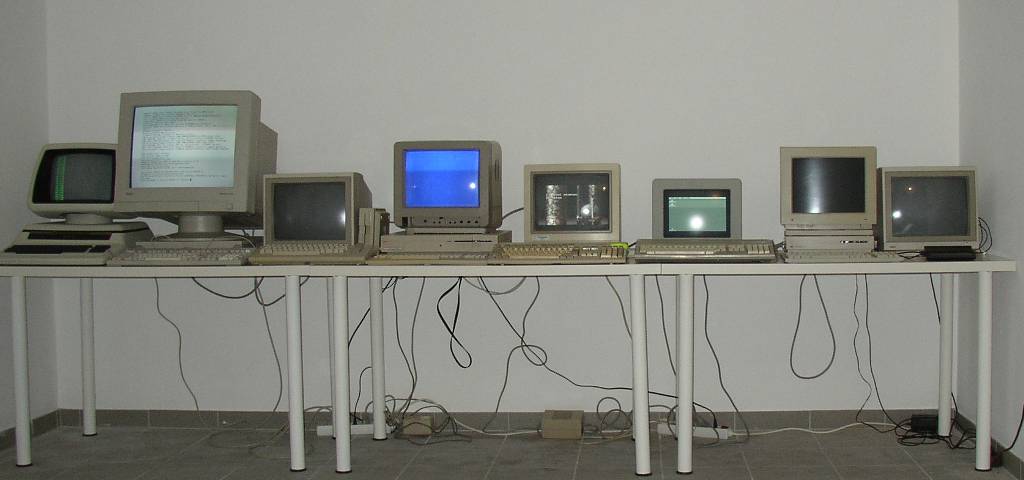
My Computer Museum

Since I finally got sufficient space in my new cellar, I started looking for old computer systems - mainly 8bit and 16bit home computers I owned in the past, or others that I would have liked to possess back then. The problem always used to be: in order to buy the next generation computer, I had to sell my old one - pocketing horrible losses most of the time.

Today my major source is EBay. Still it's an elaborate task to find and purchase the right hardware, external devices and cabling. And: some prices just go through the roof at EBay. E.g. I must have bid on an Apple II on at least five occasions, but so far it always turned out too expensive at the end.

So here is my current collection:


From left to right:
(1) Sun SparcStation 5, NEC 21" VGA Monitor
(2) Commodore 128D, Commodore 1901 Color Monitor
(3) Commodore Amiga 500 (2x)
(4) Atari 1040ST, Atari SM124 Monochrome Monitor
(5) Apple Macintosh LC, Apple Monochrome Monitor
(6) Sinclair ZX81

Latest Purchases:
(1) Commodore CBM8032
(2) Commodore 1084 Color Monitor

Currently looking for:
(1) Apple II
(2) Atari SC1224 Color Monitor

Monday, March 07, 2005

Netscape 8 Beta

Netscape 8 marks another low point in usability, pursuing a long history of an inferior user interface, which dates back to the days of version 0.9 (in my opinion, this weakness was also one of the main reasons for losing the browser war against IE).

This time it looks like "Death by Flamboyancy":

Thursday, March 03, 2005

Default-Encoding Considered Harmful

Now this is the third time within a year that I am sitting in front of a contractor's library banging my head, because their implementation just cannot handle simple Byte-Streams (you heard right, two different contractors, three different implementations, all of them bogus). And the root of all evil is the same each time - those guys didn't know the difference between Streams and Readers/Writers.

Unfortunately some people who pretend to be Java or .NET developers went through a Teach-Yourself-In-24-Hours or similar training, where all they did on I/O was to open a text file using Reader/Writer-classes. So why Readers/Writers and not InputStreams/OutputStreams? Because unlike Streams, Readers/Writers have these nice character-based methods, which let you write strings directly (no need to convert them to byte-arrays first).

Readers and Writers are not inherently evil (the opposite is true, they are very useful - whenever one wants to apply an encoding-conversion or when consistently having to deal with character-based data, but they are dreadful when tansferring binary data). The problem is most people don't grasp that Readers and Writers are meant for character-data - and they tend to forget to parameterize them with the proper encoding (many programmers today are not even aware there are such things like codepages, single-byte and multi-byte characters, little endian/big endian byte order, etc).

So when they have a string in-memory, which is Unicode, hence consists of wide characters (double-byte, AKA UTF-16), and try to write that string to the filesystem using a non-encoding-aware Writer, the platform's default encoding will be applied (hey, the default encoding might even depend on localization settings - this happens in case of the lame "but it used to work on my PC"-excuse), which means that the file's content will differ from the memory image. E.g. the default encoding both in Java and .NET is UTF-8. So what looked like UTF-16 in-memory, will be UTF-8 on the filesystem. The corresponding Reader does just the inverse thing, so we will end up with UTF-16 in-memory after reading the file.

Where is the pitfall then? First of all: not all those encoding/decoding conversions are loss-free. Imagine converting Unicode to ASCII or ISO-8859-1. Non-ASCII- or -ISO-8859-1 will be replaced by a dummy symbol, and are lost forever. When decoded back, they can not be recovered. And: all conversions, whether loss-free or not, CHANGE your data. This is probably not what you want.

Let me tell you what happened inside our contractors' libraries:

(1) Platform: Java. Task: Download a binary file over HTTP and store it on the local filesystem.
But instead of using Streams and working on byte-arrays, this master-of-disaster preferred to open a StreamReader on the TCP-Socket's OutputStream. Why? Nobody knows. Of course the data gets corrupted (remember, default-encoding UTF-8): all values above 0x7f are expanded to two or more bytes (this is what UTF-8 is all about). Why didn't the developer just work on the Stream and read the data into a byte-array, then write the array's content 1:1 to the file? Because he only knew how to deal with Reader/Writers and character-based data. Oh, by the way, this is the same contractor who decided to implement his own deficient HTTP-protocol instead of using Http(s)UrlConnection, just because he didn't figure how to circumvent a certain proxy's non-standard-conform HTTP200-behavior (Hint: HttpsURLConnection.setDefaultSSLSocketFactory() lets you overwrite the default-handshake implementation, and just jump over flawed HTTP200-responses. See also: JavaWorld Tip 111).

(2) Platform: Java. Task: Read some character data from a file, and write it to the console.
Sounds easy. File format is ANSI, hence ISO-8859-1 encoding. Alright, this is different from UTF-8, but unfortunately AGAIN a Reader with default-encoding is instantiated and tries to read that data into a character-array, which then servers as a string's content buffer. Suddenly the contractor notices that all german umlaut characters are screwed (no wonder, these are characters that differ in UTF-8 and ISO-8859-1 representations). Probably after wasting some time on trial and error, he finally figures out that if he transferred those characters once more using another Writer, the two flawed encodings and decodings would neutralize each other, and - voila - german umlauts appear correctly on his screen. (Man, this gives me a headache).

(3) Platform: .NET. Task: Take some in-memory strings and write them to a text-file.
The text-file's format should be ISO-8859-1. Yes, you guessed right. .NET's default happens to be UTF-8. The StreamWriter is opened without explicitly telling it which encoding to use, and again everything works until characters above 0x7f come along.

How to do it right.
It is really trivial: this is how to download a file from a HttpConnection in Java (absolutely no need for Readers/Writers) - simplified for better readability (e.g. some close()-invocations should go to finally-blocks):

HttpURLConnection httpConn = (HttpURLConnection)url.openConnection();
httpConn.setRequestMethod("GET");
httpConn.setRequestProperty("connection", "close");
// snip

BufferedInputStream in = new BufferedInputStream(httpConn.getInputStream());
BufferedOutputStream fileOut = new BufferedOutputStream(new FileOutputStream("mypdf.pdf"));
byte[] buffer = new byte[4096];
int cnt = 0;
for (int res = 0; res != -1; res = in.read(buffer)) {
    fileOut.write(buffer, 0, res);
}
fileOut.close();


And if you want to convert Strings/char-arrays to byte-arrays and vice versa, use:

java.lang.String:
public byte[] getBytes(String encoding)
public String(byte[] bytes, String encoding)

When you are in need of Readers/Writers on top of Streams, apply InputStreamReader/OutputStreamWriter and pass the defined encoding to their constructors:

java.io.InputStreamReader:
public InputStreamReader(InputStream in, String encoding)

java.io.OutputStreamWriter:
public OutputStreamWriter(InputStream in, String encoding)

The same goes for .NET:

System.Text.Encoding:
public virtual byte[] GetBytes(string s)
public virtual string GetString(byte[] bytes, int index, int count)

System.IO.StreamReader:
public StreamReader(Stream stream, Encoding encoding)
System.IO.StreamWriter:
public StreamWriter(Stream stream, Encoding encoding)